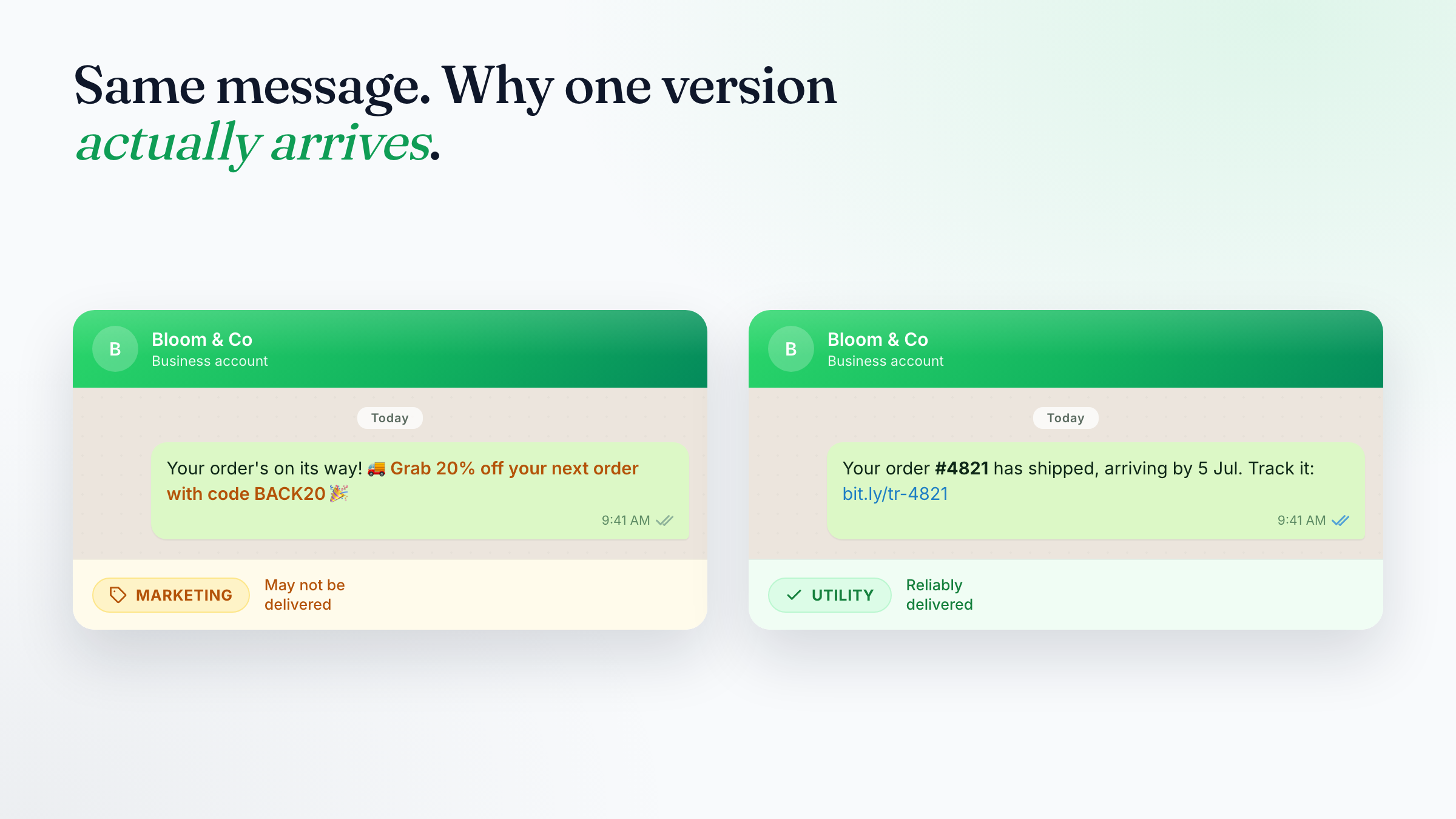
If you send WhatsApp template messages to customers, the single word Meta stamps on each template — UTILITY or MARKETING — quietly decides two things: how much you pay to send it, and how likely it is to actually reach people. UTILITY is cheaper (often free) and rarely throttled. MARKETING is always charged and more easily muted. The catch is that you don't get the final say — Meta reads the wording of your template and decides for you. This guide explains, in plain language, exactly how that decision is made and how to write your templates so they land on the UTILITY side of the line.
1. Why the Category Matters (It's Really About Deliverability)
It's tempting to think of this as a pricing question. It isn't — or not mainly. The more important consequence of the category is whether your message actually reaches the customer at all.
WhatsApp caps how many marketing messages a person receives, and lets anyone switch marketing off entirely without unsubscribing from your business. So the moment a message is classified as MARKETING, it has to compete for the customer's limited marketing slots — and it can be silently throttled, delayed, or never delivered. A UTILITY message isn't subject to those marketing limits: order updates, reminders, and confirmations get through even to customers who've muted your promotions.
| UTILITY | MARKETING | |
|---|---|---|
| Deliverability | Reliably delivered — not subject to marketing limits | Can be throttled or dropped — competes for the user's marketing cap, easy to mute |
| Reaches customers who muted marketing | ✅ Yes | ❌ No |
| Cost | Free inside an open 24-hour service window; low-cost otherwise | Always charged |
| Best for | Order updates, reminders, confirmations, account alerts | Offers, promotions, announcements, re-engagement |
The bottom line: If an operational message — an order update, an appointment reminder, a payment notice — gets classified as MARKETING, it can quietly fail to arrive. A reminder that never reaches the customer is a far bigger problem than a few cents on the bill. Getting the wording right is really about making sure the message lands.
The frustrating part is that a template can be reclassified after it's approved. You can submit something as UTILITY, have it approved, and then get a notice weeks later that Meta has moved it to MARKETING because the wording drifted too close to promotion. So the goal isn't just "get approved" — it's "write it so it stays UTILITY," and keeps landing in the inbox.
2. The One Rule That Decides Everything
Meta's own definitions come down to a single question:
Is this message informing the customer about something they did, requested, or must know — or is it trying to sell, promote, or persuade them into something new?
- Informing → UTILITY
- Selling or persuading → MARKETING
In Meta's words, UTILITY templates "follow up on user actions or requests" and are "typically triggered by a user action." MARKETING templates exist "to generate awareness, drive sales, and retarget customers."
To qualify as UTILITY, a template has to pass both of these tests:
- It is non-promotional — no offers, no persuasion, no selling.
- It is tied to that specific customer — their order, their account, their appointment — or it's genuinely critical to them (a safety alert, a fraud warning, a recall).
If a template fails either test, it becomes MARKETING. Keep both in mind every time you write one.
3. What Counts as UTILITY
These are the message types Meta recognises as utility, as long as the wording stays neutral and specific:
| Category | Real examples |
|---|---|
| Order updates | Order confirmation, payment received, "shipped" notice with tracking, delivery update, refund processed |
| Appointments & bookings | Booking confirmation, appointment reminder, reschedule confirmation, "your table is ready" |
| Account & billing | Balance update, payment reminder, invoice due, subscription-expiry notice (as information, not an upsell), account-setup request |
| Feedback tied to a transaction | "How was your recent order #4821?" — a survey about a specific transaction the customer just had |
| Opt-in / opt-out | Confirming a customer subscribed or unsubscribed |
| Conversation continuity | Moving an existing support chat from another channel to WhatsApp |
| Critical alerts | Fraud warnings, service outages, product recalls, severe-weather or health notices |
Notice the common thread: every one of these points back to something specific and real — an order number, a booking, an account, a transaction that already happened.
4. What Quietly Tips a Template into MARKETING
This is where most businesses lose the classification without realising it. Any of the following will push a template to MARKETING — even if the rest of the message is perfectly transactional:
- Offers and discounts — "10% off," "special price," "limited-time deal"
- Upsells and cross-sells — "Customers who bought this also loved…," "Upgrade to Premium"
- Renewal persuasion — "Don't miss out — renew now and save!" (a neutral "Your plan expires on 12 Aug" is fine; the sell is what breaks it)
- Generic re-engagement — "We miss you!", "It's been a while — come back"
- Vague, browse-y CTAs — "Check out our new collection," "See what's new," "Explore more"
- Generic surveys — "How are we doing?" or "Rate our app!" not tied to a specific transaction
- Hype and promotional tone — exclamation-heavy, emoji-stuffed, "🔥 HUGE NEWS 🔥"
- All-variable or empty templates — a template that's only
{{1}} {{2}}with no clear meaning defaults to MARKETING
The mixed-content trap: Meta treats a template with both utility and marketing content as MARKETING — entirely. One promotional line poisons the whole message. An order-confirmation that ends with "…and enjoy 15% off your next order!" is a marketing template, full stop. There is no partial credit.
5. The Rewrite Playbook: Before → After
The fastest way to learn the line is to see the same message written both ways. In each pair below, the "before" gets classified as MARKETING; the "after" is UTILITY-safe. The change is almost always removing the sell, not the information.
Order follow-up
- ❌ "Hi Sarah! Your order is on its way 🚚 While you wait, grab 20% off your next order with code BACK20!"
- ✅ "Hi Sarah, your order #4821 has shipped and is expected to arrive by 5 July. Track it here: {{1}}"
Appointment reminder
- ❌ "Reminder: your appointment is tomorrow. Book a second session now and save $30!"
- ✅ "Reminder: your appointment with Dr. Lim is tomorrow, 4 July at 2:30pm. Reply RESCHEDULE if you need to change it."
Subscription / renewal
- ❌ "Your plan is ending soon — renew today and don't miss out on exclusive member perks! 🎉"
- ✅ "Your Pro plan expires on 12 August 2026. To keep your account active, renew from your billing page: {{1}}"
Feedback request
- ❌ "How are we doing? Rate us and get a voucher!"
- ✅ "Thanks for your recent visit on 1 July (booking #229). How was your experience? Reply 1–5."
Payment reminder
- ❌ "Don't forget to pay — and check out our new premium tier while you're at it!"
- ✅ "Your invoice #7734 for $128.00 is due on 10 July. Pay here: {{1}}"
See the pattern? The UTILITY version names a specific thing (an order number, a date, an invoice, a booking) and stops there. The moment it reaches for a "while you're at it," it's marketing.
6. A Worked Example: Acknowledging a Website Form Submission
One of the most common WhatsApp messages a business sends is also one of the easiest to get wrong: the instant acknowledgement when someone fills in a form on your website. A lead submits their details, and you want to reply on WhatsApp straight away — to reassure them and to open a conversation. This is a textbook UTILITY message… as long as you word it as a confirmation and not a sales pitch.
Here's a version that stays firmly on the UTILITY side:
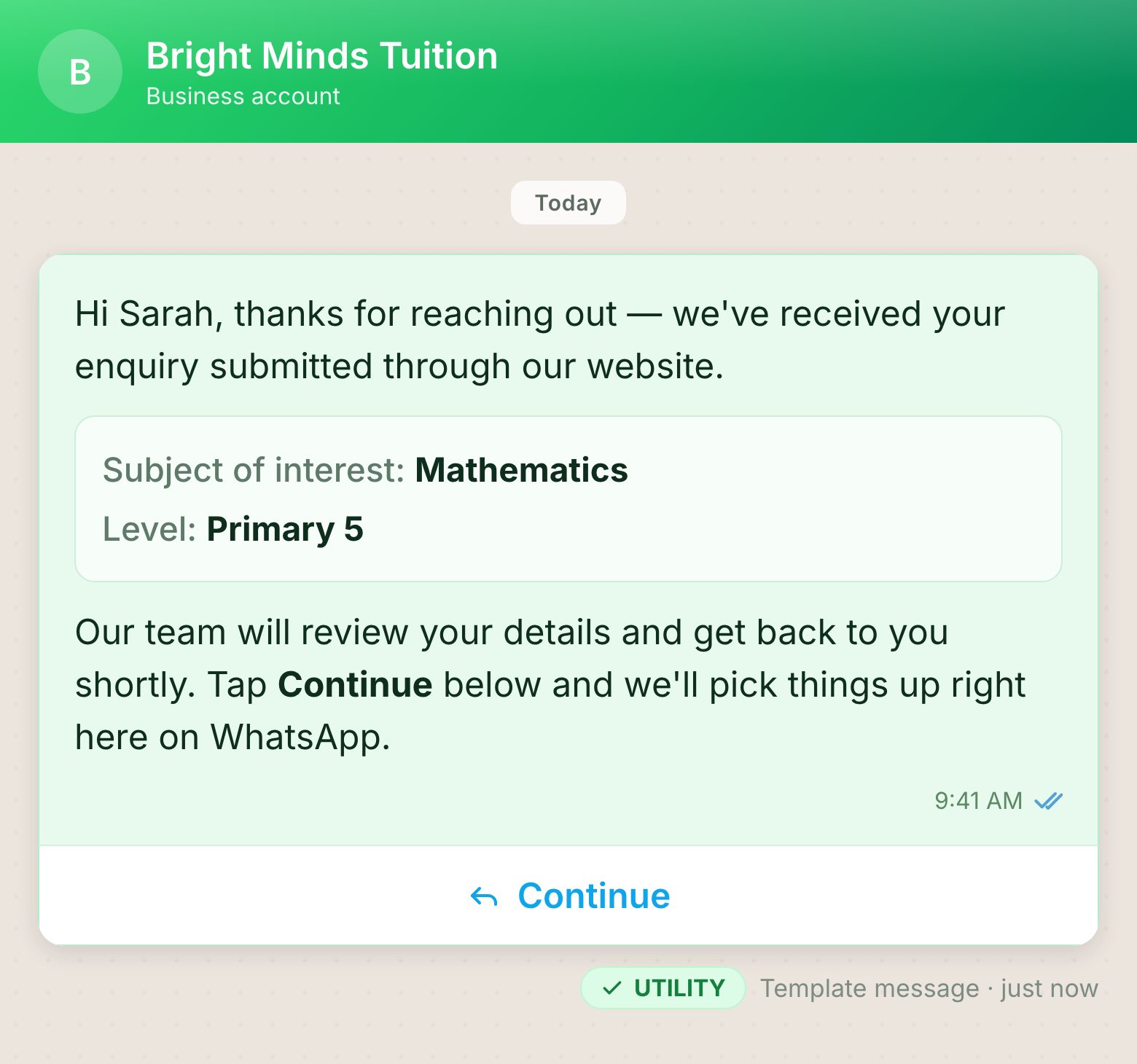
The name, subject, and level are personalised variables (
{{name}}, {{subject}}, {{level}}) that fill in from each form submission.Why this stays UTILITY:
- It's triggered by the customer's own action. They just submitted your form, so a confirmation is exactly the kind of follow-up Meta treats as utility.
- It echoes back their specific details — the subject and level they entered. That specificity is the clearest signal that this is a personal acknowledgement of their submission, not a broadcast.
- It only informs. It confirms receipt and sets the expectation that a human will follow up. No offer, no pitch, no "enrol now."
- The button is about continuity, not promotion. "Continue" simply moves the conversation forward on WhatsApp — and continuing an existing conversation is a recognised utility use case.
A useful bonus: when the lead taps Continue, their reply opens a 24-hour customer-service window. Inside that window your team can chat freely — no templates, no restrictions — to actually qualify and help them.
What would tip this exact message into MARKETING:
- Bolting on a promo — "…and enjoy 20% off your first month if you sign up this week!"
- Turning the acknowledgement into a pitch — "Check out our top-rated tutors and book a free trial now!"
- Dropping the specifics for a generic "Thanks for your interest! We'd love to work with you 🎉" — with nothing tying it to their actual submission, it reads as marketing.
Keep the acknowledgement to "here's what we received, here's what happens next" — and let the real conversation happen after they reply.
Tip: Because the person filled in your form, that submission is also your basis to message them. Put a clear consent line on the form itself (that they'll be contacted on WhatsApp), and your acknowledgement stands on solid ground.
7. Six Wording Principles That Keep You on the UTILITY Side
-
Write it like a system notification, not a marketing email. "Order shipped" beats "Your order is on its way! 🎉". Aim for the tone of a bank SMS.
-
Anchor to something specific. Include a concrete reference — an order number, invoice number, booking ID, appointment date, or amount. Specificity is the signal Meta looks for to justify UTILITY. Vague messages default to MARKETING.
-
Inform, don't persuade. State the fact. A neutral link to "renew" or "pay" is fine; a pitch to renew is not.
-
No offers, ever. No discounts, codes, deals, bonuses, or "limited-time" language — not even at the very end.
-
Keep surveys transaction-specific. Reference the exact order or visit ("your order #4821"), never a generic "how are we doing?".
-
Don't let one line ruin the whole template. Re-read the entire message before submitting. If a single sentence sells something, split it out into a separate MARKETING template instead of contaminating a UTILITY one.
A useful test: Read your draft and ask, "Would a customer who never wants marketing still expect and want this exact message?" If yes, it's utility. If it's something they'd only want if they were in a buying mood, it's marketing.
8. Picking the Right Category When You Submit
When you create a template you choose a category. Choose honestly — selecting UTILITY on a promotional message doesn't fool anything:
- If you pick UTILITY but Meta's review decides the content is promotional, it's approved as MARKETING and charged accordingly. You don't get to override that at submission.
- Templates that are unclear (only variables, or generic filler) default to MARKETING.
- Choosing the category that genuinely matches your content is the most reliable path to fast approval and to staying in that category later.
9. What Happens If Meta Reclassifies You
Even an approved UTILITY template can be moved to MARKETING later if Meta decides the wording is promotional. Here's how that plays out:
- You usually get one day's notice before a UTILITY template is switched to MARKETING. The template keeps working — only the category (and the price) changes.
- Repeat offenders lose the notice. If your business has already been warned for mis-categorising templates, Meta can reclassify with no advance warning at all. This is why it pays to get the wording right the first time rather than treating reclassification as reversible.
10. If You Disagree: The 60-Day Review Window
If a template is classified — or reclassified — in a way you believe is wrong, you can ask Meta to review it:
- You have 60 days to request a category review through Business Support.
- The clock starts from the template's creation date (if it was approved as you submitted it) or from the date Meta changed the category (if it was reclassified).
- If the review agrees with you, the category reverts. If not, the reclassification stands.
Before appealing, honestly re-read your template against Sections 4–6. Most reclassifications are correct — the wording drifted promotional. An appeal works best when your template is genuinely transactional and you can point to the specific order/account reference that proves it.
11. Quick-Reference Cheat Sheet
Keep this next to you when you write templates.
| Signal | UTILITY-safe | Turns it MARKETING |
|---|---|---|
| Purpose | Inform about a specific action/transaction | Sell, promote, or win back |
| Reference | Names an order, invoice, booking, account | Generic, no specifics |
| Offers | None | Any discount, code, or deal |
| CTA | "Track order," "Pay invoice," "Reschedule" | "Shop now," "See what's new," "Upgrade" |
| Surveys | Tied to a specific transaction | "How are we doing?" |
| Tone | Neutral, factual, system-notification | Hype, emojis, exclamation marks |
| Content mix | 100% transactional | Even one promotional line |
A UTILITY-safe skeleton you can reuse:
"Hi {{name}}, [factual status update] for [specific reference — order/booking/invoice #]. [One neutral next step + link, if any]. [Optional: reply KEYWORD to change/cancel]."
Fill that in with real, specific details — and resist the urge to add "…and while you're here." That one instinct is what separates a free UTILITY message from a charged MARKETING one.
Where This Fits in Exabloom
Inside Exabloom, you create and submit these templates from your workspace, and we pass them to Meta for approval along with the category. Everything in this guide is about the wording you put inside them — the part Meta reads to make its decision. For the step-by-step of building, submitting, and using templates in the product, see our WhatsApp Templates guide in the Help Center.
Write your transactional messages to inform, anchor every one to something specific, and keep the selling in separate marketing templates. Do that, and the UTILITY classification — with its lower cost and better reach — will follow.